

A heavy-duty monitor arm is only useful when its load range, VESA plate, and desk mount all fit the actual setup. We compared six current single arms for large and ultrawide screens, separating 44-pound models from higher-capacity options that reach 57 inches and nearly 60 pounds.
Quick picks
We screened 20 Amazon US listings and ranked six exact, in-stock ASINs using published fit, motion, and installation details.

VIVO STAND-GT57 Heavy-Duty Ultrawide Monitor Arm

STAND-GT57 covers the widest useful fit range in this group: up to 57 inches, 48.4 pounds for curved screens or 59.4 pounds for flat screens, and VESA patterns through 200×200 mm. Its pneumatic arm, top-side clamp, reinforcement plate, and detachable VESA plate make it the most complete documented match for today’s oversized displays.
- Up to 57-inch screens; 48.4 lb curved or 59.4 lb flat-screen limit
- VESA 75×75 through 200×200 mm
- Pneumatic arm with top-side clamp and included reinforcement plate

Separate curved and flat load limits, 57-inch coverage, and VESA support through 200×200 mm give it the broadest clearly documented fit in the final six.
The pneumatic arm provides 11.8 inches of height adjustment, +55 to -30 degrees of tilt, 360-degree swivel, and 90-degree rotation.
Top-side clamp and grommet hardware, a reinforcement plate, cable covers, and a detachable VESA plate simplify setup, though the published 1.5-inch desk limit is narrower than several rivals.
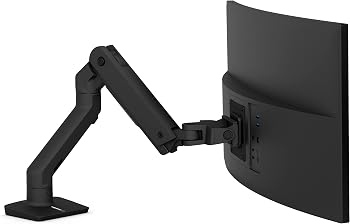
Ergotron HX Premium Heavy-Duty Monitor Arm
The HX is the premium choice for buyers who value mature support and a tightly specified 20-to-42-pound working range. It offers 11.5 inches of lift, 360-degree rotation, cable management, clamp and grommet mounting, and a listed 10-year warranty. Deep 49-inch curved displays such as the Odyssey G9 may require Ergotron’s separate heavy-duty pivot.
- Defined 20-42 lb working range for large monitors
- 11.5 in lift, 360° rotation, and 75° tilt
- Clamp and grommet mounting with a listed 10-year warranty
The well-defined 20-to-42-pound range suits many large displays, but the standard pivot needs a separate accessory for some deep 49-inch curved monitors.
Constant Force assistance, 11.5 inches of lift, 360-degree rotation, and 75 degrees of tilt provide a strong documented ergonomic range.
Clamp and grommet options, cable management, extensive compatibility documentation, and a listed 10-year warranty lead the group for long-term support.

monTEK 57-Inch Heavy-Duty Monitor Arm
monTEK pairs a published 59.4-pound limit and 57-inch screen range with the lowest observed price among the near-60-pound finalists. It extends 19.7 inches, adjusts from 11.3 to 22 inches high, and includes clamp and grommet hardware. Its narrower 75×75/100×100 VESA support is the key fit limitation.
- 17-57 inch screens with a published 59.4 lb limit
- 19.7 in reach and 11.3-22 in published height range
- Quick-release VESA plate with clamp and grommet mounting
A 59.4-pound limit and 57-inch coverage provide excellent headroom, while the 75×75/100×100 VESA range is narrower than VIVO's.
The arm documents 19.7 inches of extension, an 11.3-to-22-inch height range, ±75-degree tilt, 180-degree swivel, and ±90-degree rotation.
Clamp and grommet bases, cable management, and a quick-release plate are practical, but desk-thickness and warranty details are less complete than the leaders.
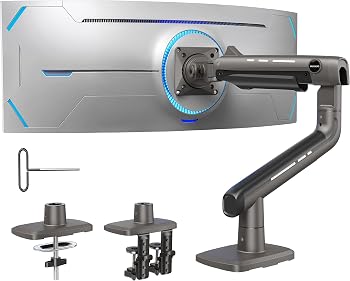
HUANUO TitanLift Heavy-Duty Monitor Arm
TitanLift fits 17-to-49-inch monitors weighing 6.6 to 44 pounds and reaches 22.5 inches, the longest published extension in this group. Its 0.8-to-3.5-inch desk range suits thicker wooden desktops, but HUANUO explicitly advises against plastic or glass desks and requires a clear underside without interfering beams or panels.
- 6.6-44 lb range for 17-49 inch screens
- 22.5 in extension and up to 19.6 in VESA-center height
- Dual C-clamp plus clear wooden-desk compatibility rules
The 6.6-to-44-pound working range and 49-inch limit cover common ultrawides, with standard 75×75 and 100×100 mm VESA support.
A 22.5-inch extension, up-to-19.6-inch center height, ±50-degree tilt, 180-degree swivel, and 360-degree rotation provide generous reach.
The 0.8-to-3.5-inch desk range is useful and constraints are unusually explicit, though limiting use to suitable wooden desks reduces universal fit.
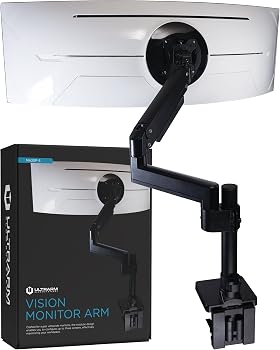
ULTRARM MA20P-S Heavy-Duty Monitor Arm
MA20P-S uses an extra-tall pole and modular extension-arm design for buyers who need vertical flexibility or may later build a stacked setup. The single arm supports up to 44 pounds and ultrawides up to 57 inches, with 13 inches of gas-spring height adjustment and broad clamp/grommet desk ranges. VESA support stops at 100×100 mm.
- Up to 57-inch ultrawides and 44 lb
- Extra-tall modular pole with 13 in gas-spring height adjustment
- Clamp for 0.6-3.3 in desks plus grommet for 0.6-1.9 in desks
A 57-inch size limit is unusually broad for a 44-pound arm, but VESA support is limited to 75×75 and 100×100 mm.
The tall pole and 13-inch gas-spring height range are useful, while ±25-degree tilt is narrower than the other finalists.
Separate, clearly documented clamp and grommet ranges plus cable management and modular expansion reduce setup friction.

MSI MAG MT201 Heavy-Duty Monitor Arm
MAG MT201 is the lowest-priced finalist and still carries official MSI documentation for 17-to-49-inch screens and a 4.4-to-44-pound range. It includes clamp and grommet bases, a quick-release VESA plate, and full tilt, swivel, and rotation. It does not match the 57-inch or near-60-pound headroom of the top picks.
- 4.4-44 lb range for 17-49 inch flat or curved screens
- Official MSI spring-tension design with quick-release VESA plate
- Clamp and grommet bases with published desk-thickness ranges
The 4.4-to-44-pound range, 49-inch limit, and standard VESA patterns cover many mainstream ultrawides but not the heaviest 57-inch displays.
Spring assistance, +50/-20-degree tilt, ±90-degree swivel, and ±180-degree rotation provide the core full-motion adjustments.
Official documentation, quick-release VESA plate, cable routing, and both clamp and grommet bases make setup clear for a value-priced arm.
Heavy-duty monitor arms compared
| Rank | Monitor arm | Published screen size | Published weight range or limit | VESA patterns | Published motion | Desk mounting limits |
|---|---|---|---|---|---|---|
| 1 | VIVO STAND-GT57 | Up to 57 in; TVs up to 55 in | 48.4 lb curved; 59.4 lb flat | 75×75, 100×100, 100×200, 200×100, 200×200 mm | 11.8 in height; +55/-30° tilt; 360° swivel; 90° rotation | Top-side clamp or grommet; desk up to 1.5 in |
| 2 | Ergotron HX | Up to 49 in; curve/depth conditions apply | 20-42 lb | 75×75, 100×100, 200×100, 200×200 mm | 11.5 in lift; 360° rotation; 75° tilt | Clamp 0.4-2.6 in; grommet included |
| 3 | monTEK 57-inch arm | 17-57 in | Up to 59.4 lb | 75×75, 100×100 mm | 19.7 in reach; 11.3-22 in height; ±75° tilt; 180° swivel; ±90° rotation | Clamp or grommet; thickness not documented in checked listing |
| 4 | HUANUO TitanLift | 17-49 in | 6.6-44 lb | 75×75, 100×100 mm | 22.5 in reach; 19.6 in center height; ±50° tilt; 180° swivel; 360° rotation | Wood desks 0.8-3.5 in; no underside obstruction |
| 5 | ULTRARM MA20P-S | 24-57 in; curved to 1000R | Up to 44 lb | 75×75, 100×100 mm | 13 in height; ±25° tilt; 180° swivel; 180° rotation | Clamp 0.6-3.3 in; grommet 0.6-1.9 in |
| 6 | MSI MAG MT201 | 17-49 in | 4.4-44 lb | 75×75, 100×100 mm | +50/-20° tilt; ±90° swivel; ±180° rotation | Clamp 10-85 mm; grommet 10-35 mm |
Published load limits may change with screen curvature, depth, or VESA adaptation. Confirm the exact display and desk before ordering.
How we ranked these monitor arms
This is a desk-research comparison. BestStuffGuide did not load-test these arms or measure sag, wobble, cycle life, or clamp strength. We screened 20 current Amazon candidates, then kept six complete single-monitor arms from six brands. Every finalist had an exact ASIN, a visible price above $50, an in-stock signal, and enough published detail to compare the same fit questions.
Display fit and capacity account for 40% of the Editorial Rating. We compared stated weight ranges, screen-size limits, curved-screen conditions, and VESA patterns. Positioning range makes up 35%, including lift or height, reach, tilt, swivel, rotation, and spring assistance. Mounting and ownership make up the final 25%, with attention to clamp and grommet options, desk limits, VESA installation, cable management, and published warranty or support details.
Match the monitor, not just the diagonal
A 49-inch display can fit one arm and overload another. Start with the monitor’s weight without its stand, then check its curve, depth, and VESA pattern. Ergotron, for example, states that some deep 49-inch curved displays need its separate heavy-duty pivot even when the listed weight falls within the HX arm’s range.
VIVO separates its published limit for curved and flat screens: 48.4 pounds for curved displays and 59.4 pounds for flat ones. Treat that distinction as a fit rule, not as optional headroom. A monitor near the limit also leaves less margin for unusually deep housings or adapters.
VESA patterns and adapter plates
VESA numbers describe the horizontal and vertical spacing between mounting holes. Four finalists support the common 75×75 and 100×100 mm patterns. VIVO and Ergotron also list larger patterns, which can avoid a separate adapter on some heavy displays. If an adapter is required, include its weight and depth when checking the arm’s limits.
Check the desk before the arm arrives
Measure the desktop thickness and inspect both the top edge and the underside. A clamp needs a flat, strong surface and enough clearance below for its screw or top-side hardware. A grommet mount needs a suitable hole and the correct thickness range. Crossbars, cable trays, beveled edges, and rear privacy panels can block either method.
HUANUO gives the clearest material warning in this set: TitanLift is recommended for wooden desks, not plastic or glass, and the underside must be free of interfering beams or panels. VIVO’s top-side hardware is convenient when rear access is tight, but its checked listing limits desk thickness to 1.5 inches. ULTRARM covers thicker clamp mounting, up to 3.3 inches, and states a separate 0.6-to-1.9-inch grommet range.
Reach, lift, and tilt solve different problems
Reach determines how far the monitor can move toward the user or across a deep desk. HUANUO publishes 22.5 inches of extension, while monTEK lists 19.7 inches. Lift or height range matters when the screen must clear a laptop, speaker, or secondary display.
Tilt becomes more important as a screen gets taller. VIVO publishes +55 to -30 degrees, monTEK lists ±75 degrees, and HUANUO lists ±50 degrees. ULTRARM’s ±25-degree range is narrower, but its extra-tall pole may be more useful for a stacked layout. Rotation figures should not be treated as proof that every large curved panel can safely turn to portrait orientation; monitor dimensions and cable clearance still apply.
Spring tension must match the installed weight
Gas-spring, pneumatic, and mechanical spring arms need correct tension for the monitor they carry. An arm adjusted for a light screen may rise on its own, while one set too loose for a heavy screen may drift downward. Support the display during installation, follow the stated adjustment direction, and make small changes until the monitor holds its position.
Do not force an adjustment screw past its documented stop. If the arm will not balance a monitor that is within the published range, recheck the monitor weight, VESA installation, spring adjustment, and any curve or depth restriction before assuming the mechanism is defective.
Installation and safety checklist
- Confirm the monitor’s weight without its original stand.
- Match the VESA pattern and use the specified screws, spacers, and plate orientation.
- Check desk material, thickness, edge clearance, and underside obstructions.
- Use a reinforcement plate when the manufacturer supplies or requires one.
- Keep the screen supported until the VESA plate and safety lock are fully engaged.
- Route cables with enough slack for the full motion range.
- Recheck fasteners after initial use and if the display begins to shift.
Do not clamp an arm to cracked, hollow, glass, or otherwise unsuitable furniture unless both the arm and desk manufacturers explicitly allow it. A published arm capacity does not certify the desk.
Frequently asked questions
How much extra capacity should a monitor arm have?
The monitor must fall inside the manufacturer’s stated working range, including any separate limit for curved or deep screens. More headroom can widen the range of compatible displays, but it does not replace correct spring adjustment or desk support. Avoid arms with a minimum load above the monitor’s actual weight.
Can a 44-pound arm hold a 49-inch ultrawide?
Sometimes. The monitor’s actual weight, depth, curve, and VESA pattern all matter. The Ergotron HX standard pivot shows why: some deep 49-inch curved screens require a different pivot even when the arm’s nominal weight range looks suitable.
Is a grommet mount stronger than a clamp?
Neither method is automatically stronger on every desk. Strength depends on the desk material, thickness, hole or edge condition, included hardware, and correct installation. Use the method and thickness range specified by the arm manufacturer.
Do I need a reinforcement plate?
Use one when it is included or recommended. A plate spreads the load over a wider area and can protect the surface, but it cannot make a weak or unsuitable desktop safe. VIVO includes a reinforcement plate with STAND-GT57.
Why does my monitor arm sag?
Common causes include incorrect spring tension, a display outside the supported range, a loose VESA plate, wrong spacers or screws, or a curve and depth combination the pivot does not support. Keep the monitor supported while checking the installation.
Final verdict
VIVO STAND-GT57 is the best overall choice because it combines 57-inch coverage, separate curved and flat load limits, broad VESA support, and practical top-side mounting. Ergotron HX is the premium pick for buyers who value detailed compatibility guidance and long support, while monTEK offers the strongest high-capacity value. Choose HUANUO TitanLift for thick suitable wood desks and long reach, ULTRARM MA20P-S for a tall modular pole, or MSI MAG MT201 for an affordable 44-pound arm with official documentation.