

The best home automation hub is the one that connects your actual devices and runs the routines you need. Homey, Hubitat and Home Assistant offer broad automation platforms; Aqara, Hue and Lutron make more sense when their devices already fill your home. SwitchBot adds a useful dial for IR appliances. Check the exact version before buying: the current US Aeotec V4 omits Z-Wave, and the standard Hubitat C-8 Pro differs from its Thread Special Edition.
Quick picks
These research-based recommendations compare documented capabilities and setup requirements; BTG did not perform hands-on product tests.

Homey Pro (2026) Smart Home Hub with Zigbee, Z-Wave and Thread

Choose the 2026 Pro for a mixed collection of supported Zigbee, Z-Wave and Matter devices when you want their radios in one hub. It includes Advanced Flow and has 4 GB RAM. Check each Homey app before buying, and budget separately for Ethernet. US 433 MHz transmission is disabled.
- Zigbee, Z-Wave and Thread
- Advanced Flow included
- Ethernet adapter sold separately

The US hub combines Zigbee, Z-Wave, Thread and IR with supported Homey apps. Check the exact device app; US 433 MHz transmission is disabled.
Flow and included Advanced Flow support configurable automation. Local rules still depend on whether each connected integration needs its own cloud service.
Mobile and web apps provide control, and remote access is included. Wired networking requires the optional Homey Ethernet adapter.

Hubitat Elevation C-8 Pro US Smart Home Hub with Zigbee and Z-Wave
Choose the standard C-8 Pro for configurable local rules and a mix of supported Zigbee and US Z-Wave devices. Its Matter controller does not turn paired Zigbee devices into Matter devices. Matter over Thread needs a separate border router; the Thread Special Edition is a different model that gives up built-in Zigbee.
- Zigbee and US Z-Wave radios
- Rule Machine automation
- External Thread router required
The standard US C-8 Pro includes Zigbee and US-frequency Z-Wave. Matter needs a supported driver; this model is not the Thread Special Edition.
Rule Machine provides multi-condition automation on the hub. Cloud integrations and voice services retain their own internet requirements.
The local web interface and mobile/dashboard routes provide several ways in. Remote Admin for off-site administration is an optional paid service.

Nabu Casa Home Assistant Green Smart Home Hub with Preinstalled Software
Green suits readers who want Home Assistant without installing it on a spare computer. It comes with power and Ethernet, but no onboard wireless radios. Plan the radio and remote-access route for your devices before ordering; the broad software support does not make the bare hub a ready-to-pair Zigbee or Z-Wave controller.
- Home Assistant preinstalled
- 4 GB RAM and 32 GB storage
- Wireless radios sold separately
Home Assistant supports a broad integration library, but Green itself has no onboard wireless radios. Direct Zigbee, Thread and Z-Wave connections require suitable extra hardware.
Home Assistant automations support conditions, choosing branches, waiting and repeating steps. Green hosts the platform; local rules still rely on the selected integrations being local.
Web and mobile interfaces provide local control. Remote access needs Home Assistant Cloud or another configured connection; voice integration may add setup or subscription requirements.

Aeotec Smart Home Hub 2 V4 US SmartThings Hub without Z-Wave
Choose the current US V4 when SmartThings is your preferred app and your devices use supported Zigbee or Matter routes. The selected GP-AEOHUBV4US does not support Z-Wave. A power adapter and Ethernet cable are listed, and setup requires a SmartThings account. Check device-specific local execution before relying on an offline routine.
- Zigbee, Matter and Thread router
- Wi-Fi or Ethernet uplink
- US V4 excludes Z-Wave
The selected US V4 connects compatible Zigbee and Matter devices and has a built-in Thread border router, corroborated by Samsung and the exact-model US seller. It explicitly excludes Z-Wave.
SmartThings routines coordinate supported devices, and eligible local automations can run on the hub. Internet-dependent services remain dependent on their clouds.
SmartThings provides the phone interface and supported voice integrations. Setup requires the app, an account and a network connection.

Aqara Hub M3 HM-G01E Matter Controller with Thread and IR
M3 fits an Aqara household that also needs supported Matter devices or IR air-conditioner control. Its Zigbee pairing is limited to Aqara devices. Choose a compatible PoE power route or supply the required USB adapter separately. Only one IR AC can be exposed through Matter, and available functions vary by platform.
- Aqara Zigbee and Matter
- Thread border router and IR
- USB power adapter not included
M3 pairs Aqara Zigbee devices and supported Matter devices, and can bridge supported Aqara devices outward. Third-party Zigbee pairing is excluded.
Aqara edge/local automations and IR control provide useful routines. Cloud notifications and some platform features still require internet; supported Matter device types vary.
Aqara Home and supported external ecosystems provide app and voice routes. USB-C power needs a separate 2 A adapter, or compatible PoE equipment.
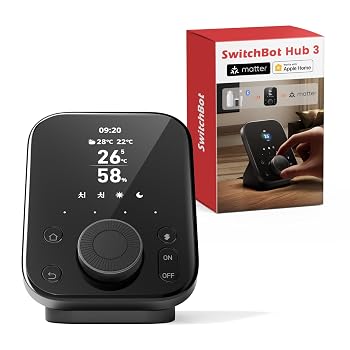
SwitchBot Hub 3 W7202100 Smart Home Hub with Display and Dial
Hub 3 is the pick for people who want buttons and a dial next to their IR appliances and SwitchBot devices. Matter bridges supported devices and can provide virtual-button control through another platform. Configure local learned-IR control explicitly, and verify discrete on/off commands before placing an appliance in an automatic routine. The seller lists one Hub 3 but does not itemize the power adapter or dedicated sensor cable; confirm both before ordering.
- Display, dial and four scene buttons
- SwitchBot Matter bridging
- 2.4 GHz Wi-Fi; IR control
IR control and SwitchBot Bluetooth devices are its main fit. Matter bridging and virtual buttons add supported external-platform routes; this is not universal direct radio pairing.
The app supports scenes and schedules. Learned IR remotes must be added to Hub 3 for local button control, and a power-toggle-only remote needs particular care in routines.
The display, dial and four scene buttons provide substantial physical control alongside the app. External ecosystem control still needs its supported platform setup.

Philips Hue Bridge Pro 582114 Smart Lighting Hub, One Pack
Choose Bridge Pro for a larger compatible Hue lighting system. The maker specifies 150 lights and 50 accessories, and the selected offer includes a power supply and Ethernet cable. Review migration support before replacing an old bridge. A higher capacity limit alone is not a reason to upgrade a working smaller system.
- Hue lighting scenes and automation
- Maker-rated 150 lights, 50 accessories
- Power supply and Ethernet cable
The bridge is designed around compatible Hue lighting and accessories, with supported external-platform integrations. It is a lighting bridge, not a general Zigbee coordinator.
Hue scenes and time-based lighting automations suit a focused lighting system. This receives the specialist 7-band score; broad cross-device rule logic depends on an external platform.
Hue app control and supported Apple, Google and Alexa integrations provide several routes. Migration and device compatibility should be checked before replacing an existing bridge.

Lutron Caseta L-BDG2-WH Smart Hub for Clear Connect Devices
Choose this standard L-BDG2-WH hub when your goal is app control and scheduling for Caseta devices. It is a focused Clear Connect bridge and uses Ethernet to your router. Caseta switches and Pico remotes can still operate locally without internet, while app access and external integrations have separate dependencies. Its retailer box list names only the bridge; confirm the power supply and cable contents.
- Caseta Clear Connect devices
- Ethernet connection to router
- Scenes and timeclock schedules
Clear Connect links supported Caseta devices and Serena shades. External platform integrations do not turn it into a generic Zigbee or Z-Wave hub.
The hub adds scenes and timeclock scheduling for the Caseta system. Broad multi-condition automation depends on a connected external platform.
The Lutron app and supported voice ecosystems offer control. The hub uses wired Ethernet, and the app-to-hub connection relies on internet service.
Core specifications compared
| Product | Primary device connections | Matter / Thread role | Network uplink | Power and extra hardware |
|---|---|---|---|---|
| Homey Pro (2026) Smart Home Hub with Zigbee, Z-Wave and Thread | Zigbee 3.0; Z-Wave 700; BLE; IR | Matter controller; Thread border router | 2.4/5 GHz Wi-Fi; optional Ethernet adapter | Power adapter supplied; Ethernet adapter separate |
| Hubitat Elevation C-8 Pro US Smart Home Hub with Zigbee and Z-Wave | Zigbee 3.0; US Z-Wave 800/LR | Matter controller, not bridge; external Thread router | Wi-Fi or Ethernet | US supply and Ethernet cable; Thread router separate |
| Nabu Casa Home Assistant Green Smart Home Hub with Preinstalled Software | No onboard wireless radios; USB expansion | Matter controller app on Home Assistant OS; external Thread router | Gigabit Ethernet | Supply/Ethernet included; radio hardware separate |
| Aeotec Smart Home Hub 2 V4 US SmartThings Hub without Z-Wave | Zigbee 3.0; Thread; no Z-Wave | SmartThings Matter controller; built-in Thread border router | Wi-Fi or Ethernet | Adapter and Ethernet cable listed; SmartThings account |
| Aqara Hub M3 HM-G01E Matter Controller with Thread and IR | Aqara Zigbee; Thread; IR | Matter controller and bridge; Thread border router | 2.4/5 GHz Wi-Fi or PoE Ethernet | Separate 2 A USB supply or compatible PoE equipment |
| SwitchBot Hub 3 W7202100 Smart Home Hub with Display and Dial | SwitchBot BLE; IR; supported external Matter routes | Matter bridge; virtual buttons through external platform | 2.4 GHz Wi-Fi | Requires 5 V/2 A and dedicated sensor cable; selected seller does not itemize adapter/cable |
| Philips Hue Bridge Pro 582114 Smart Lighting Hub, One Pack | Hue Zigbee lighting and supported accessories | Matter via bridge; external ecosystems | Ethernet or Wi-Fi (maker recommends Ethernet) | One bridge, power supply and Ethernet cable; lights separate |
| Lutron Caseta L-BDG2-WH Smart Hub for Clear Connect Devices | Lutron Clear Connect; Caseta and Serena | Supported platform integrations; no generic Matter claim | Ethernet to router; no Wi-Fi uplink | Plug-in power and Ethernet; maker says supplied Ethernet; retailer adapter contents unverified |
The table describes the selected single-hub offers, not complete smart-home systems. Lights, sensors and other end devices are separate. Hue capacity figures are manufacturer specifications. SwitchBot and Lutron retailer box lists do not fully itemize their power accessories, so confirm those contents before ordering.
Choose the platform around your devices
For a mixed collection of devices
Homey Pro (2026) is the broadest built-in-radio option in this shortlist. Its US version combines Zigbee, Z-Wave and Thread, with Homey apps supplying device-specific support. The 2026 model has 4 GB RAM; an Ethernet connection needs the separate adapter. Check the Homey app entry for each important device. A radio logo alone does not establish that every device function is available. Homey also disables 433 MHz transmission in the US.
The standard Hubitat C-8 Pro suits readers who want to build detailed local rules around supported Zigbee and US Z-Wave devices. Keep the version distinction clear: the Thread Special Edition replaces the standard model’s Zigbee radio with Thread. Buying it does not add Thread while retaining built-in Zigbee. The standard model can use Matter-over-Thread devices through an external Thread border router and the documented commissioning route.
Home Assistant Green takes a different approach. It provides the preinstalled automation computer, with Ethernet and USB expansion. You choose suitable radio hardware and integrations. Home Assistant supports conditions, branching, waits and repeating steps, but setting up those rules and maintaining integrations remains your job. Choose Green when you want that flexibility and are willing to configure it.
For an existing ecosystem
Aeotec Smart Home Hub 2 V4 fits a SmartThings household using supported Zigbee and Matter devices. The exact US model has Thread support and a built-in border router, but no Z-Wave. Samsung lists Matter 1.5 and Thread 1.4; the manufacturer-listed US seller explicitly identifies the border-router role. Older Aeotec buying advice can describe a different hub, so confirm GP-AEOHUBV4US before replacing an existing installation.
Aqara M3 combines its Aqara Zigbee network with supported Matter devices, Thread and IR. Its Zigbee pairing is restricted to Aqara devices. That restriction remains even though it can participate in other ecosystems through Matter. The IR-to-Matter air-conditioner route exposes only one AC, and the available controls depend on the receiving platform.
Hue Bridge Pro and the Lutron Caseta hub are specialist choices. Hue Pro serves compatible lighting and accessories, while Lutron uses Clear Connect for Caseta devices and Serena shades. Their integrations let another platform operate supported devices; they do not make either bridge a general-purpose Zigbee or Z-Wave coordinator. If your existing lighting system works and its limits meet your needs, adding a broader hub may accomplish more than replacing its bridge.
For buttons, a dial and IR appliances
SwitchBot Hub 3 earns its place through its physical controls. You can use the display, dial and four scene buttons alongside the app. Its Matter bridge can expose supported SwitchBot devices to another platform. Third-party control can also use virtual buttons through a compatible external platform; do not treat that as unrestricted direct pairing of arbitrary Matter devices.
Check the actual IR commands for each appliance. Residential Tech Today found power-toggle-only commands on the devices in its review. A toggle can turn an already-off device on when a routine was meant to turn it off. That observation belongs to the reviewer’s sample, not every appliance. SwitchBot’s own support documentation also requires learned remotes to be added to Hub 3 before its local button-control route is available.
Understand Matter, Thread and bridges
A Matter controller operates supported Matter devices. A Thread border router connects a Thread network to the home LAN. A Matter bridge exposes supported devices from another protocol to a Matter ecosystem. These are separate roles, and support for one does not imply the others. Home Assistant and Hubitat document these distinctions in their Matter guides.
For example, the standard C-8 Pro is a Matter controller, but it is not a Matter bridge and has no built-in Thread border router. Green runs the controller software but needs a suitable Thread route for Thread devices. Aqara M3 combines controller, bridge and border-router functions while retaining its Aqara-only Zigbee pairing restriction. Device types, firmware and supported functions still matter after those roles match.
Check power, network and remote access
Green includes its power supply and Ethernet cable. Hubitat specifies a US power supply and Ethernet cable for the standard US model. The selected Aeotec offer lists an adapter and Ethernet cable; it requires the SmartThings app and account. Homey provides a regional power adapter, with wired Ethernet as a separate purchase. Hue Pro’s selected one-pack offer lists the bridge, power supply and Ethernet cable, and the maker also supports Wi-Fi.
Aqara M3 needs a separate 2 A USB power adapter or compatible PoE equipment. SwitchBot Hub 3 requires 5 V/2 A power and its dedicated sensor cable for the stated sensor functions. The selected retailer lists one Hub 3 without itemizing those accessories; a reviewer receiving a cable and adapter does not prove what that retailer will ship. Lutron’s seller similarly lists the bridge without a detailed adapter list, while the manufacturer describes a supplied Ethernet cable. Confirm the exact box contents for both.
Local automation is a property of a particular device-and-rule path. A local rule can still call an internet service. Homey includes remote access, while cloud-dependent device integrations retain their own requirements. Home Assistant Cloud is an optional subscription for remote access and voice integrations; other remote routes need separate configuration. Hubitat’s optional Remote Admin subscription covers off-site administration, and is not required for local administration or its built-in cloud Dashboard access. Lutron distinguishes local switch/Pico operation from the app-to-hub internet connection.
When a simpler alternative may be enough
Aqara M200 and M100 are complete hubs worth considering for smaller Aqara installations. Their current listings specify 40 Aqara Zigbee plus 40 Thread devices for M200, and 20 plus 20 for M100. Both have local-automation claims; this guide does not assume that local rules require the M3. M3 is the featured Aqara pick for its documented larger device budget and Edge/migration role.
SwitchBot Hub 2 offers IR, sensors and Matter bridging with two touch buttons. The maker lists eight Matter subdevices for Hub 2 versus 30 for Hub 3; choose Hub 3 for its dial and expanded physical controls. The standard Hue Bridge can also remain a sensible choice for a smaller lighting system. Bridge Pro’s higher published capacity does not establish faster real-world response or make every working bridge obsolete.
How the recommendations were made
We retained 24 offers from the original Amazon US hub/controller category, then checked eight finalists and nine other complete controllers on their own product pages. Seven accessories or end devices stayed in the candidate record without counting as complete hubs. Current prices and availability supported screening; they are not fixed promises in the comparison table.
Each card uses the same three editorial dimensions: Device integration (40%), Automation options (35%) and Control access (25%). The overall rating is their weighted average, rounded to one decimal. Scores describe documented connections, rule options and ways to operate the system. They do not measure speed, wireless range, reliability or security, and a specialist bridge’s lower overall score does not make it a poor fit for its own ecosystem.
Primary references include Homey’s US specifications, Hubitat’s model descriptions, Hubitat’s Matter guide, Green hardware, Home Assistant automation building blocks and Matter documentation.
For the ecosystem hubs, see Samsung’s V4 specifications, the exact US V4 seller specification, Aqara M3, SwitchBot’s hub comparison, Hue Bridge Pro and Lutron’s hub explanation. The IR-command caveat comes from Residential Tech Today’s review.
Frequently asked questions
Can one hub replace every bridge?
Usually you should keep the bridges required by your exact devices. Broad software support or a shared radio protocol does not guarantee access to every device function. A general automation platform can coordinate existing bridges without replacing all of them.
Does a Matter device need Thread?
Only a Matter-over-Thread device needs a Thread network and border router. Matter also works over Wi-Fi or Ethernet. A Thread logo alone does not establish Matter support; check the device’s stated protocol and commissioning requirements.
Will the system work without internet?
Some local device and automation paths can continue when internet service fails. App remote access, voice assistants, notifications and cloud integrations may stop. Check the actual rule path and keep the required hub, network equipment and end devices powered.
Can the current US Aeotec V4 replace a Z-Wave hub?
It cannot directly take over Z-Wave devices because GP-AEOHUBV4US omits Z-Wave. Check a hub with the appropriate US Z-Wave radio if those devices are part of your installation.
Final verdict
Start with Homey Pro (2026) for broad built-in connectivity, Hubitat C-8 Pro for configurable local rules, or Green for a Home Assistant setup you can expand yourself. Choose Aeotec V4 for SmartThings and Aqara M3 for the documented Aqara expansion role. SwitchBot Hub 3 is the physical-control pick; Hue Pro and Lutron are the focused lighting-system choices. Match your devices, radio requirements and power kit before using the rating to break a tie.